Navy
81 effects and 30 presets for EffectCraft
Do by whileAI · Windows
Published Oct 24, 2026. Windows with EffectCraft 0.13 or newer.
About
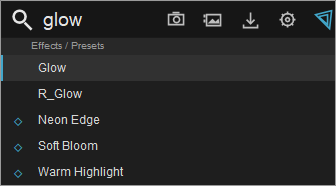
Navy adds independent image effects, ready-made presets, quick effect search and beat markers to EffectCraft.
The installer has separate components: Effects, Navy FX Console, AutoBeatMaker, Retime and Retime Pro, Render Boost with memory cleanup, and Disk Render for long exports. Repair keeps your selection and your modified files.
- 81 effects and variants, 30 presets
- Quick effect search and beat markers
- Render Boost: parallel rendering of up to 16 frames
- Disk Render: block-based ProRes export that can be resumed
- Installer with per-component choice and repair
What’s new in 0.6.1
Unified dark Fluent-style design for Navy Setup, Navy Console, Render Boost and Disk Render. Effects, presets and rendering are unchanged. SHA-256 of Navy Setup.exe is in SHA256.txt.
Permissions
Windows apps do not declare permissions. Read the source to see what the app does.
Version history
v0.6.1Oct 24, 2026
- Navy Setup.exe · 712 KB
80db112ca0d981c350dd931dd173b7886219383ed5623d6b920a7732fc552048
- Navy Setup.exe · 712 KB
v0.6.0Oct 23, 2026
Navy 0.6.0 adds resumable Disk Render and optional installer components.
- Resume interrupted ProRes exports from their saved job folder. Completed blocks are validated and reused; only missing ranges are rendered. Continuous audio and the final movie are checked before completion.
- Choose Effects, FX Console, AutoBeatMaker, Retime, Render Boost and Disk Render separately in Setup. Repair remembers the selection and preserves modified files and user data.
- Disk Render uses fresh workers and disk-backed blocks to release RAM/VRAM between ranges. MAX SPEED, CPU/GPU settings and failure backoff are included.
- Faster N_Streaks and integer-radius N_Sharpen preserve the tested pixel results. Optional Fast Deep Glow changes quality only in the export snapshot.
Close EffectCraft before Install / Repair. FFmpeg and FFprobe must be on PATH for Disk Render. Keep the job folder, media and installed effects to resume.
Validation: installer selection/repair/uninstall checks, native window checks, fractional-frame-rate video/audio parity, interrupted-block resume, legacy-job import, snapshot/block corruption rejection, and kernel parity tests.
Download Navy Setup.exe. SHA256.txt verifies the installer. Source code archives are provided by Forgejo automatically.
- Navy Setup.exe · 696 KB
4e9bd698114eba0b395a0af3e2a0e55d1a1bcdc412aaf23e66f577d4f7e31dab
v0.5.0Oct 22, 2026
Navy 0.5.0 adds Smart Cache, more effect choices and parallel export tuning.
- Exact-input Smart Cache reuses unchanged results in heavy Navy effects.
- N_ effect names, N_JpegDamage and 17 foreground dissolve variants, including N_DissolveShake. 81 choices in 63 modules, leaving one external-effect slot available.
- The installer enables four GPU frames in flight by default. This preserves image quality and can improve CPU-heavy exports. It uses more GPU memory; disable the option if needed. Existing manual limits are preserved, and uninstall restores settings changed by Navy.
- Installer checks cover repair, corruption detection, uninstall and preservation of user files.
Close EffectCraft, run Navy Setup.exe, then reopen EffectCraft. This release includes Navy Console and AutoBeatMaker. Favorites and user presets are preserved.
Performance example: a four-frame test took 11.31 s instead of 25.53 s with identical pixels on an RTX 5070 Ti 16 GB. Results depend on the project and hardware. Navy is an independent toolkit; the full Sapphire catalog is not implemented.
- Navy Setup.exe · 600 KB
abd30bb00f5c2e4b9e55f3b48289ebdd63200671e8b58f186612486a6673afa5
v0.4.3Oct 22, 2026
AutoBeatMaker now has two tabs:
- EZ Mode opens by default with five buttons: Analyze song, BPM / 2, BPM x 2, Align to playhead, and Create markers.
- Advanced Mode retains all manual timing, detection, beat selection, phase and marker options. Switching tabs preserves the analysis.
Beat detection now analyzes a mono audio snapshot with bass-weighted multiband onsets and pulse tracking. It supports missing percussion hits, shows a rhythm-confidence score, and provides half/double tempo and playhead alignment corrections. Markers remain red and named BEAT 1, BEAT 2, etc. on the song layer.
Validation: synthetic steady and syncopated 90-174 BPM tracks, silence/tone rejection, both tab layouts, marker preservation and Undo, console integration, and installer repair/uninstall passed. Confidence is an estimate; difficult tracks can still require manual timing.
Download Navy Setup.exe to install or update. Source is available through Forgejo's built-in source archives.
- Navy Setup.exe · 409 KB
b5bfe8b916a7c0854a586d2bb65502105ae7898fe2b8abfbedc74f31ed30800b
v0.4.2Oct 22, 2026
Navy 0.4.2 for EffectCraft
- AutoBeatMaker now runs inside EffectCraft as a dockable, responsive panel.
- Background audio analysis updates reliably and shows elapsed time.
- Automatic BPM and beat offset detection, with manual overrides.
- Analysis isolates the selected song; red BEAT 1, BEAT 2, etc. markers are created on its audio layer. Existing other markers are preserved; creation is one Undo step.
- Includes Navy Console, 63 effects, 30 presets, and the render optimizations from 0.3.1.
Install: download Navy Setup.exe and run Install / Repair. Source code is available through the built-in Forgejo source archives.
Validation: audio detection, automatic/manual timing, marker colors and names, marker preservation, Undo, responsive layouts, and installed file verification passed. Tempo detection is an estimate and can be adjusted manually.
- Navy Setup.exe · 405 KB
c6648368e9d4c02c42c3760306fa54956de2de8cb96878b94b84476fb8356a28
v0.2.0Oct 21, 2026
Navy 0.2.0 for EffectCraft includes 63 independent image effects and 30 original presets.
- Searchable Navy panel with categories, favorites and saved user presets.
- Animated parameters through Effect Controls.
- Windows installer with install/repair, integrity verification and safe uninstall.
- Existing Ruby effect IDs and module names retained for project compatibility.
Download **Navy Setup.exe** to install. Finish active exports before installation and restart EffectCraft afterward. Open **Window > Navy.jsx** to use the panel.
**Downloads:** installer, source archive, user guide (Russian), build instructions and SHA-256 checksums. Forgejo also provides automatic source archives for this tag.
Effects run on CPU/WebAssembly. This release does not provide full Sapphire compatibility, GPU acceleration, tracking, temporal processing or two-video transitions. Navy uses 63 of the 64 external effect slots documented for the target EffectCraft 0.13 API v1.
The repository includes recorded kernel, host, panel and installer test reports. These checks are not a guarantee of real-time playback performance. This publication does not include a new test run.
- Navy Setup.exe · 359 KB
0ab0444c0b8d8cb8b5f2e88719cb9ab038eae8829fd3c21ae3841e00d51f38b3